
Sponsored

Riviot
Well-Known Member
- Joined
- Mar 29, 2021
- Threads
- 121
- Messages
- 6,441
- Reaction score
- 10,895
- Location
- Kitsap, WA
- Vehicles
- R1T
See belowIs that something we can do? Or required some kind of password?
I’m sure it’s been posted, but having trouble finding it, so here’s the steps:
Turn on service mode from your settings menu (I think in the ‘system’ area). Tap top menu bar 5 times, swipe up on app launcher to find the RiDE icon, tap 5 times on the Thomas Edison quote, then enter code 33748.
There is a BMS section that should give you the SOH (state of health) of your battery among other things.
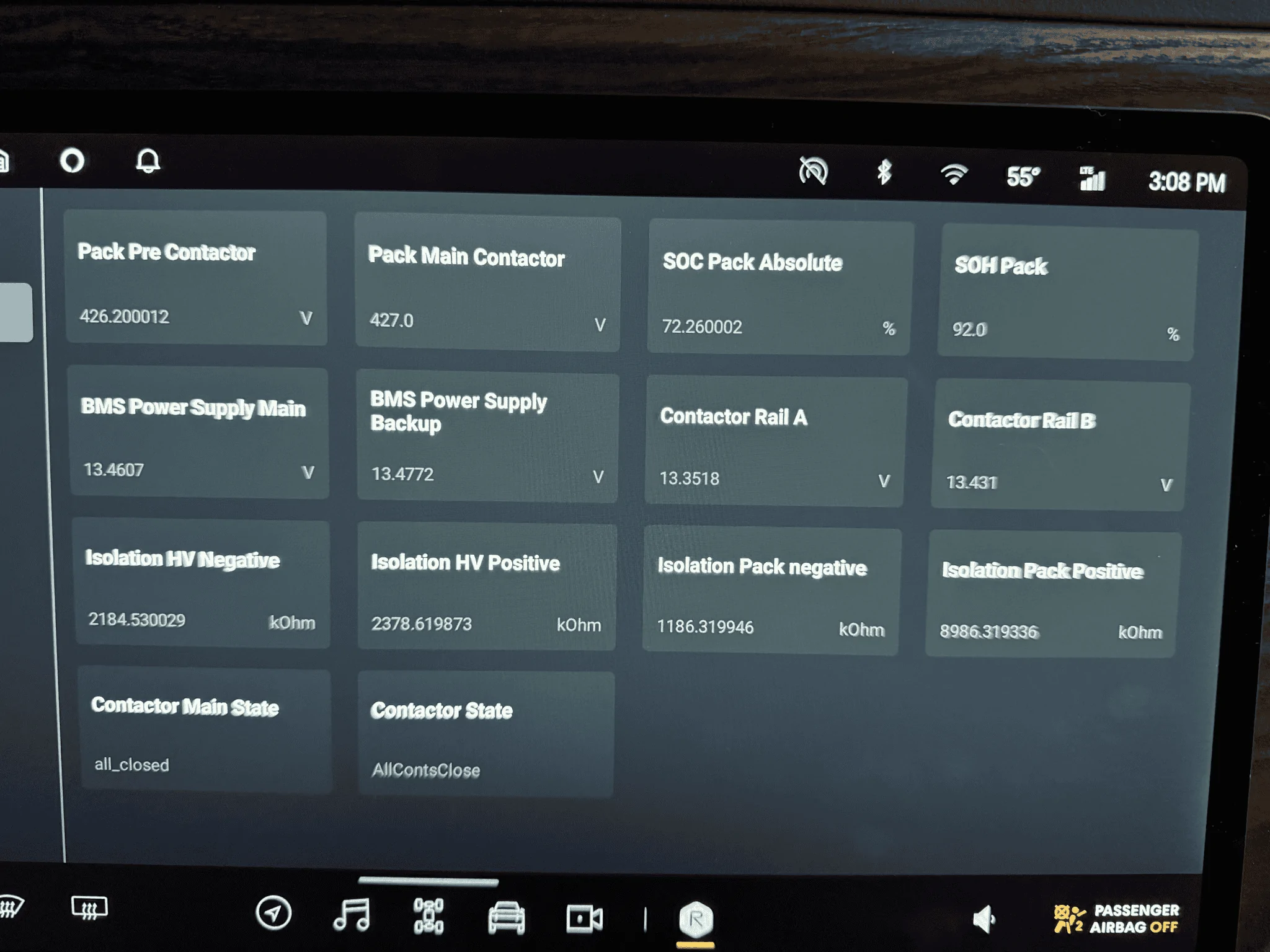
Used to look like this
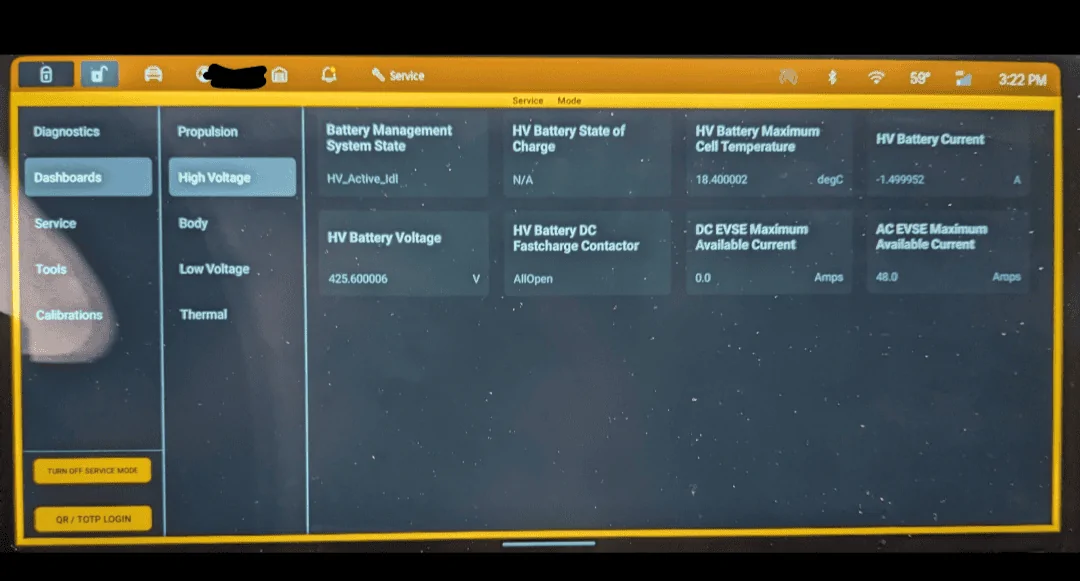
Now it looks like this
Riviot
Well-Known Member
- Joined
- Mar 29, 2021
- Threads
- 121
- Messages
- 6,441
- Reaction score
- 10,895
- Location
- Kitsap, WA
- Vehicles
- R1T
We can't see it anymore. SoH (State of Health) used to be really visible in the older versionThanks. What am I looking for to see the battery degradation percentage?
Supratachophobia
Well-Known Member
Ha, try 30% on my Model S. Total BS.Wow...considering Tesla had a tweet the other day saying only 12% degradation after 200k miles...that seems high.
Sponsored
Supratachophobia
Well-Known Member
Then all you all complained when you didn't understand the number. And now we don't have it.We can't see it anymore. SoH (State of Health) used to be really visible in the older version
Monkey
Well-Known Member
What year of S and which config and mileage? If it truly has 20% or more within 8 years/ 100K miles or > 15% within the bumper to bumper warranty period, that's a new pack installed under warranty.Ha, try 30% on my Model S. Total BS.
Tesla batteries settle or break in over time as well las the estimated range adjusting based on long-term driving habits. Even though Tesla is vague on that and many fan-boys claim that isn't the case, I've been a Tesla owner for 8-1/2 years with over 180K miles driven between my wife and I and can confirm that's exactly what happens.
Have you had the battery serviced and profiled with full diagnostics?
Riviot
Well-Known Member
- Joined
- Mar 29, 2021
- Threads
- 121
- Messages
- 6,441
- Reaction score
- 10,895
- Location
- Kitsap, WA
- Vehicles
- R1T
Then all you all complained when you didn't understand the number. And now we don't have it.

Don't blame this guy, I understand SoH curves, I was happy with my 94% @ 44k miles

SeaGeo
Well-Known Member
I'm not convinced it meant what people thought it did. What my pack BMS reports and what the SOH reports don't coincide.
Don't blame this guy, I understand SoH curves, I was happy with my 94% @ 44k miles
Supratachophobia
Well-Known Member
4 times with the full diagnostics. I have a bad brick in module 9 thanks to my canbus sleuthing. But it was "within normal operation". The warranty for my 2016 was unlimited miles/8 years. But there was no capacity clause, just failure. You may want to read the fine print again. What's funny is that it reads 70-71kwh of nominal energy, but you can't extract more than 60kwh. Once that brick drops below a certain voltage, the whole module "disappears" from the capacity calculation. Original capacity for the 90-A packs was somewhere between 84-86kwh. All very frustrating. Anyone who is going by the dash number on their Tesla is living in ignorant bliss. The only sure fire way to tell the battery health is to drive from 100% to 0% at EPA consumption (290 Watts/mile on mine) with no HVAC, and canbus monitoring. Btw, the last 4kwh on your battery is added to the range at 100% but slowly taken away until 0%. So the car is actually lying to you anyway on how far you can drive.What year of S and which config and mileage? If it truly has 20% or more within 8 years/ 100K miles or > 15% within the bumper to bumper warranty period, that's a new pack installed under warranty.
Tesla batteries settle or break in over time as well las the estimated range adjusting based on long-term driving habits. Even though Tesla is vague on that and many fan-boys claim that isn't the case, I've been a Tesla owner for 8-1/2 years with over 180K miles driven between my wife and I and can confirm that's exactly what happens.
Have you had the battery serviced and profiled with full diagnostics?
Sponsored

zymolysis
Well-Known Member
- First Name
- Ross
- Joined
- May 9, 2022
- Threads
- 3
- Messages
- 891
- Reaction score
- 562
- Location
- Phoenix Arizona
- Vehicles
- 2022 R1T [RUS, PTC (upgraded), 20"] 2008 Ford E350
- Occupation
- third party service
Large pack is rated at 131 kWh (according to Rivian).Rivian has since upped the available kWh percentage of the pack.
The physical pack is 141kWh, rated at 135kWh.
https://rivian.com/support/article/what-is-the-usable-kwh-capacity-of-your-battery-packs
scottf200
Well-Known Member
Good link/source.Large pack is rated at 131 kWh (according to Rivian).
https://rivian.com/support/article/what-is-the-usable-kwh-capacity-of-your-battery-packs
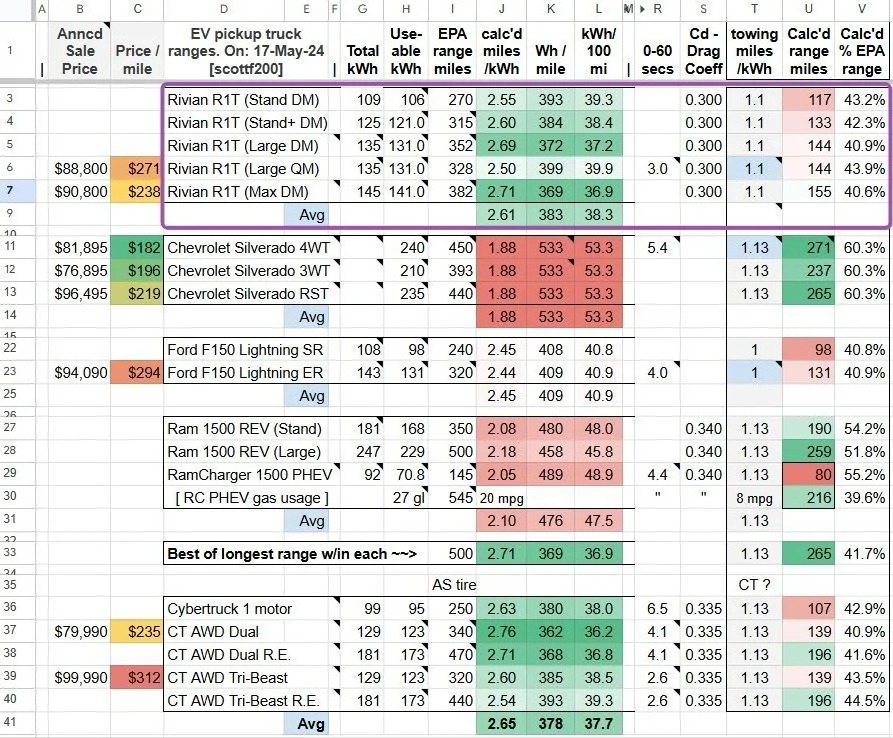
Here is my comparison Gsheet that I've spent a fair amount of time on.
Gkfisher
Member
15k miles, just charged to 90% and calculate full battery health on large battery. Put over 102kw in going from 15%->90%. Range still estimating like new.
I mostly fast charge from 20% to 70%. Occasionally at home. Only a handful of times to 95%+
I mostly fast charge from 20% to 70%. Occasionally at home. Only a handful of times to 95%+
Sponsored
Similar threads
- Replies
- 2,291
- Views
- 632,908

- Replies
- 95
- Views
- 10,899


